
Engaging with your audience and building meaningful relationships can be challenging. Use these top 10 email marketing platforms to simplify the process.
The maelstrom of digital marketing channels has left marketers in a state of frenzy. Not only are there a lot of questions on what to do and how to do it, but also choosing the right channels. This has introduced doubts, especially regarding the state of email marketing.
Is email marketing dead? Do people even open their inboxes in todayʼs day and age?
The market is extremely saturated. And this has confused even the most savvy marketers. But make no mistake. Thereʼs no question that email marketing is still effective in reaching prospects. Actually, itʼs one of the few mediums that does the job quite well.
If done right, it works wonders for your campaigns.
Because itʼs not just about sending emails, but directly delivering value into your prospects’ inboxes. Thatʼs what makes the most difference.
You arenʼt waiting for your prospects to find you or grasp your value. Youʼre meeting them at their own doorstep. This is why emails are such an indispensable facet of connection.
However, not all modern marketers understand the cruciality of establishing and prioritizing inbox placement.
If you havenʼt yet future-proofed your email campaigns, especially in terms of deliverability, itʼs time to start.
And start now with the best email marketing platforms in the market.
Criteria for Evaluating Email Marketing Platforms
According to last yearʼs report by Marketo Engage, email marketing will require less decision-making. It will witness machine domination.
The machines will do a better job at email marketing than the people involved- itʼll be actively AI-led. At least thatʼs what Marketo predicts.
Thatʼs why itʼs becoming more and more crucial to choose the appropriate email marketing platform. So, when the time comes to integrate AI with it, itʼs seamless to pivot. Without the minimum number of disruptions, loss of data, and momentum.
Hereʼs how you can make sure you choose the right one-
Contact Management
The base for all your email marketing platforms is your contact list.
With email marketing software, you can store the names of your contacts and email addresses in a secure manner. Many tools also allow you to collect further information, like an address, a birth date, or any other custom contact information.
Most platforms should allow you to add contacts manually, import them from an existing file, or set up a form that you can embed on your website that collects information and automatically adds the contact information to your list.
Basic List Segmentation
The majority of email marketing platforms available in the market have basic systems for segmenting your contact list. For example, you can create specific lists for different groups or apply tags to contacts to label them.
Segmenting your list allows you to send targeted emails to specific audience segments, increasing the overall conversion rate.
Email Templates
Most email marketing platforms make it simple to send emails by offering pre-made templates for simple emails, newsletters, and promotional emails. You can use these and edit them to fit your needs, saving time and frustration.
Drag-and-Drop Email Builder
One of the most common features of the email marketing software is the drag-and-drop builder. It allows you to custom-create your emails by dragging various elements wherever you want them to appear in the email.
And you can also customize some of the existing templates by adding your favorite elements through this very feature.
Email Scheduling
A scheduling feature allows you to set up your emails in advance and schedule them to go out on the day and time of your choice.
Simple Automation
Thanks to the automation hype, even the free versions of email marketing software offer basic automation features, allowing you to set up emails activated by ‘triggers.’
The welcome messages you get after signing up on various platforms are all automated emails. You have to set up your email list, and voila! You can save time and effort by not having to send an email manually every time you acquire new subscribers.
The Best 10 Email Marketing Platforms in the Market Today
1. Brevo
Source: Brevo
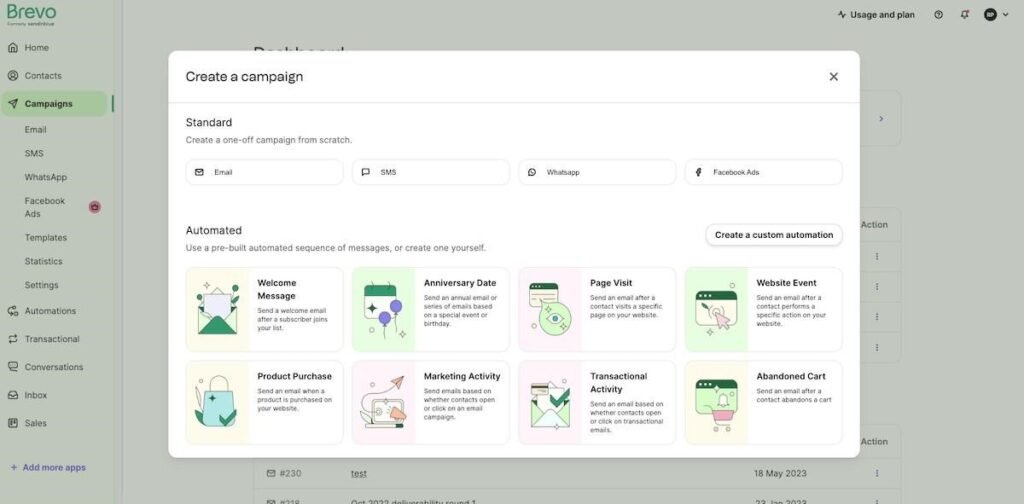
Brevo (previously Sendinblue) is the perfect choice if you want something at a lower price with all the services you want. Itʼs mostly known for its live chat feature and online scheduling tool.
Brevo offers a robust in-built CRM, along with the capabilities of customizing your automation, segmentation, and integration processes.
It may take longer to be familiar with it than some of the other choices. But it also has some great features, such as SMS marketing, pre-designed email templates, and email triggers that you can set up based on user behavior.
Significant Features that Stand Out
- Template designs optimized for specific CTAs: All these templates are included in all plans, even in the free one. And you can code your own customized newsletter, which you can then save as a template.
- Predictive send time feature: Leverages past campaign data to outline the best time to deliver your campaign.
- Built-in CRM: One of the simpler CRM solutions with a well-designed and clean deal pipeline. Users arenʼt overwhelmed with navigation and hundreds of options. There are different editing and adding columns.
- Brevo Conversations: A live chat tool that facilitates the construction of real-time scenarios with pre-defined Q/A workflows. There’s unlimited access to automated triggers and integration support with WhatsApp, Facebook, and Instagram.
- A directory of Brevo experts for migration support.
Pros
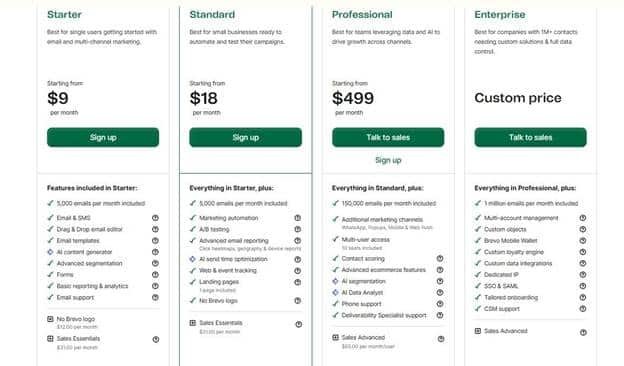
- Low-cost pricing model starting from $9.
- One of the best marketing automation software for Shopify with excellent workflow automation.
- Affordable SMS marketing and transactional emails.
- Versatile, extensive, and logical AI assistant that can help refine content and send times.
- Even the free plan has a sales CRM attached.
Cons
- The free plan has an email send limit of 300.
- No in-house migration support.
- Only an AI agent is available for support. Thereʼs no live chat.
- An expensive multi-user plan that starts at $12 per user per month.
Pricing
Brevo is a bit different from other email marketing platforms. It doesnʼt charge per subscriber but per email. And for those who donʼt send newsletters regularly, thereʼs also a pay-as-you-go option.
Thatʼs the custom price option.
Hereʼs more on what Brevoʼs pricing is actually like-
Source: Brevoʼs Pricing Plan
2. ActiveCampaign
Source: ActiveCampaign
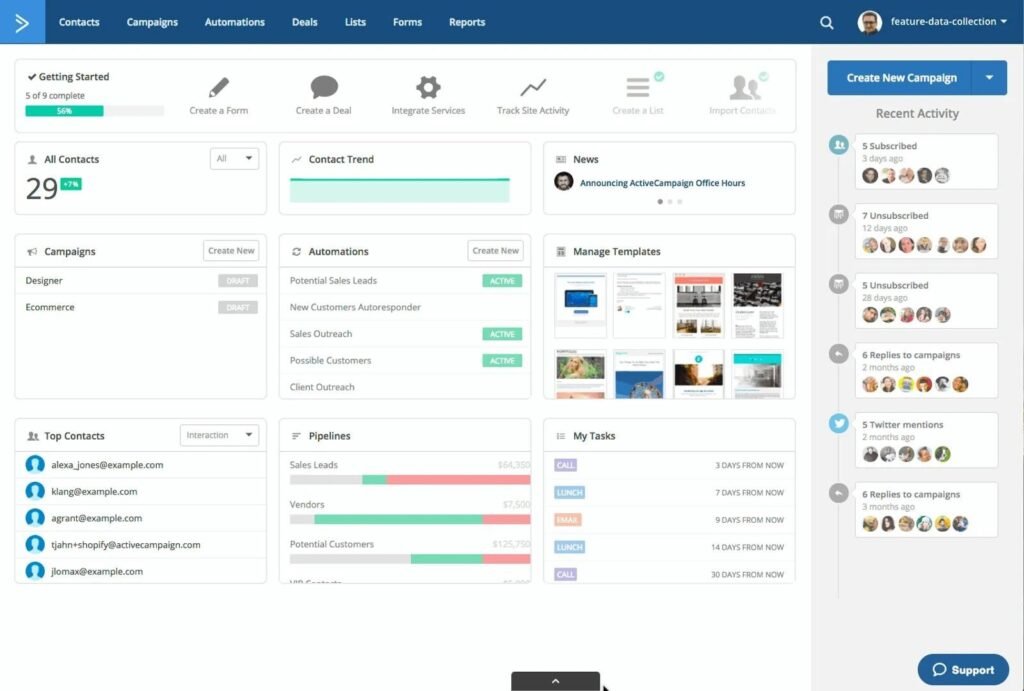
ActiveCampaign stores all your necessary features in one place- email marketing, automation, and CRM. Itʼs not only user-friendly, but also cost-efficient. And the overall price points depend on the features you actually need and the size of your contact list.
Moreover, itʼs designed to adapt to the rampant market changes. And hosts a bunch of innovative features, such as website tracking, email targeting, and a chatbot for seamless query resolution.
ActiveCampaign is a fitting match for e-commerce platforms and a substantial advantage for those who own an online store.
Significant Features that Stand Out
- ML for email optimization: ActiveCampaign instills ML capabilities to gauge the best times to send emails, as well as the engagement potential of a campaign. Not only does it outline the open rates for your campaign, but it also highlights its effectiveness through intelligent adjustments and predictions.
- Advanced automation workflows: ActiveCampaignʼs granular email marketing automation tools surpass many of its competitors. They analyze every intricate detail across multi-step processes that are also customizable through different events, triggers, and actions. This makes ActiveCampaign effective for complex email marketing strategies.
- Site and Event Tracking: This functionality helps marketers track prospects’ behavior and actions across their website or app. And then this data is used to personalize email campaigns and automation sequences.
Pros
- Hyper-precision targeting: Email list segmentation based on a vast range of criteria.
- Automated follow-ups: Sophisticated email marketing automation tools that send timely and relevant follow-up content to prospects and existing customers.
- Ease of use: Its user-friendly interface is extremely intuitive, affording seamless creation of professional emails and smart workflows. There are also comprehensive tutorials and constant customer support to help new users navigate the multitude of options.
Cons
- Thereʼs a learning curve to being able to gauge the maximum potential of ActiveCampaignʼs email marketing features.
- While it does offer CRM capabilities, they aren’t as pronounced as dedicated CRM platforms.
- A few users have seldom reported challenges with email deliverability, which can hamper the performance of the overall campaign.
Pricing
ActiveCampaign offers four different plans according to business type and use case-
- Enterprise: At $229 per user/month, itʼs the most advanced plan. Suitable for large enterprises with extensive needs, such as a dedicated AR, customized reporting, and in-depth onboarding.
- Lite: $9 per user/month for startups and small businesses. Supports all basic features except CRM and lead scoring.
- Plus: $49 per user/month for growing businesses. Includes basic features plus CRM and lead scoring.
- Professional: $129 per user/month. For larger companies with more complex and intricate needs, such as more comprehensive marketing automation tools, like attribution reporting, site messaging, and nuanced performance reporting.
3. Mailchimp
Source: Mailchimp
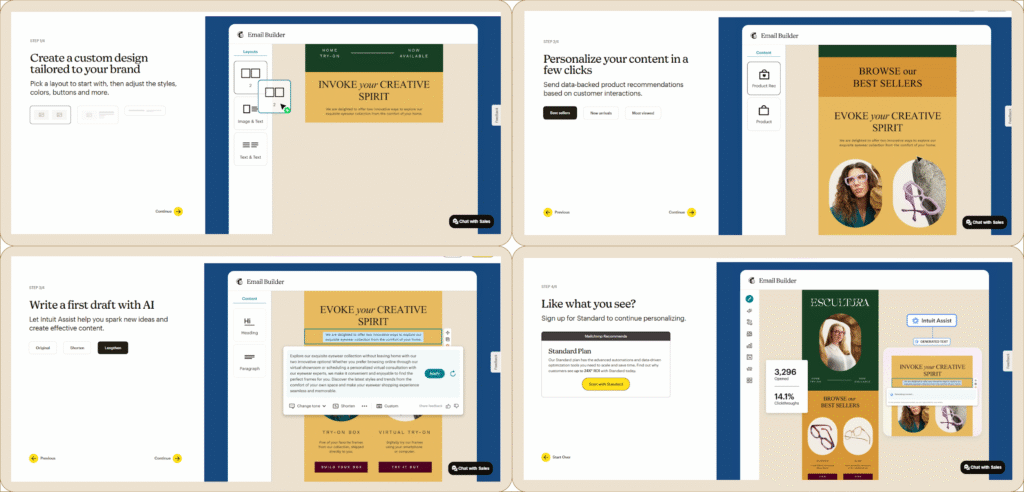
MailChimpʼs AI-powered email marketing platform is a cost-efficient choice for freelancers, startups, and small businesses- all those on a shoestring budget.
Itʼs quite simple to use and entails all the basic features for you to automate your email marketing. Moreover, it has many recommendations to help you further enrich your campaigns, such as the subject line helper and the content optimizer.
You can consider the built-in GenAI tool to help you write your first draft. Especially if youʼre new to email marketing and donʼt know where to begin. All you need to do then is review, make a few tweaks, and hit publish!
Significant Features that Stand Out
- Unlimited templated emails and forms, i.e., a vast template library: With the market saturated with the lookalikes of a single marketing flow, Mailchimp strives to do better. It offers marketing and sales branded and professional templates that lean more towards relevancy than blast campaigns. Choose any template for different business types and scenarios.
- Seamless Shopify store integration: Mailchimpʼs integration capabilities with Shopifyʼs online store make it much easier for your team to track behavioral data. Now, not only can you extract comprehensive analytics, but choose from an extensive repository of designs and branding options.
- Strong email deliverability: Mailchimp retains an average email deliverability rate of 99% and above into the inboxes as opposed to spam folders. And almost 25 times the ROI.
- SMS marketing in sync: SMS is a strong addition to an already robust email marketing tool. This facilitates Mailchimp users in building a more omnichannel campaign. And as email and SMS work in tandem, you can recover abandoned carts, trigger immediate engagement, and send transaction updates timely.
Pros
- User-friendly, intuitive, and versatile interface.
- Access to detailed analytics to optimize campaigns with efficiency.
- Sturdy automation features that save time and effort.
- Rapidly create very professional-looking emails through simple design and branding tools.
Cons
- Template customization is limited.
- Customer support is quite restrictive and often frowned upon.
- Complex features that seem overwhelming for new users.
Pricing
MailChimp offers price plans according to the number of contacts in your database.
- Free: 1000 email sends monthly to a single audience. And the email support is only available for the first 30 days after activation. Limited access to email templates and creative assistance.
- Essentials: $4.36 per month for the first 12 months. And then itʼs $8.47 per month. 5000 email sends monthly to over 3 different audiences. Offers 24*7 email and chat support.
- Standard: $6.50 per month for the first 12 months. And then itʼs $13.01 per month. Allows 6000 email sends monthly to 5 different audiences. The first plan entails a single personalized onboarding session.
- Premium: $130.15 per month for the first 12 months. And then, $260.29 per month. Entails private migration services with over 150k monthly email sends. And unlimited audiences and users that you can cater to using this plan. Itʼs the only plan to have a dedicated onboarding specialist.
4. Hubspot
Source: HubSpot
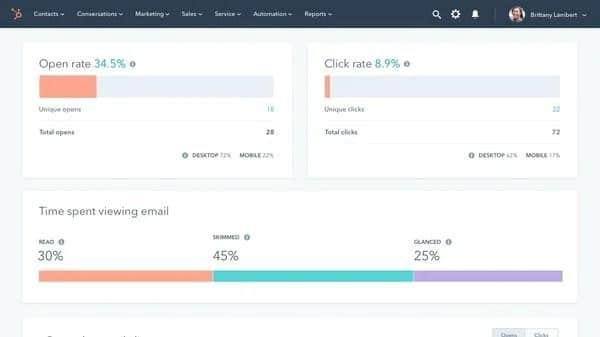
HubSpot is a well-known software in the CRM and email marketing domains. It offers a free version of its email marketing platform that enables you to design and automatically manage campaigns and automation for no cost.
Though the main reason for using HubSpot is its integration capabilities with other software, specifically CRM. It enables you to extract more information from your subscribers and to personalize your emails even more.
Moreover, they entail more unique characteristics, such as calculating the best time to send emails for a higher open rate and a higher percentage of email deliverability, A/B testing to assess which emails work better, and a print-out option for reports to monitor progress.
Significant Features that Stand Out
- Drag and drop email editor: This feature makes email designing a breeze. And is known for its simple, intuitive, and smart usability. It helps users curate visually stunning designs without the need for any technical knowledge. And the designs are responsive across devices with real-time previews. You can build an email from scratch or customize an existing template.
- Performance tracking and analytics: Easily track the most crucial email marketing metrics across a single dashboard. Especially to pinpoint how your prospects are engaging with the email. This will help your team develop a strategy that aligns both delivery time and impact.
- Collaborative email development: There are role-based permissions in MailChimpʼs Premium plans, where multiple collaborators can work on a single email. Different members can maintain control through distinct access levels. The goal? Teamwork, productivity, and accountability.
- Automated workflows: HubSpotʼs are very powerful, especially visually. Teams can map out sequences, from welcome emails to drip campaigns. And you can choose from various pre-built templates for any stage of the SaaS marketing funnel.
Pros
- As you go up the tier, the automation capabilities become more advanced.
- Allows sophisticated CRM integration that allows for in-depth personalization.
- Offers granular analytics for each account.
- Robust lead capture through a myriad of forms and CTA at every turn point.
- Consent options work to discard bots and only capture leads with intent.
- Entails a huge repository of educational resources in its HubSpot Academy.
- All-in-one platform with features that ensure synergy between marketing, sales, and customer services.
Cons
- Quite expensive if you want to access its full set of complex features and capabilities.
- Only the paid plan entails email authentication, which impacts the deliverability rate in the free plan.
- The email editor has very basic blocks.
- Thereʼs limited support available for low-tier plans.
Pricing
- Free: 2000 email sends available to a limited number of marketing contacts. HubSpot branding remains on all emails, and thereʼs only community support accessible, not a dedicated one.
- Starter: $15-20 per month per core seat (could come in a bundle with the CRM suite). Email sends are available for over 1000 marketing contacts. Unlocks up to 10 more automated options and allows the removal of HubSpot branding.
- Professional: $890 per month (billed annually). Available for 2000 marketing contacts. Entails unlimited automated workflows, dynamic content, A/B testing, advanced segmentation, etc.
- Enterprise: Over $3600 per month for over 10k marketing contacts. Entails all the premium features such as multi-touch attribution, advanced reporting, and field-level permissions.
5. Drip
Source: Drip
Drip is an email and SMS marketing platform for businesses that run independently on e-commerce services. Itʼs compatible with most of the major online shopping platforms and provides you with automated campaigns to boost your sales.
Although there is no free version, Drip limits the trial to 14 days. The pricing is quite simple and depends on the number of contacts youʼre managing on the platform.
Significant Features that Stand Out
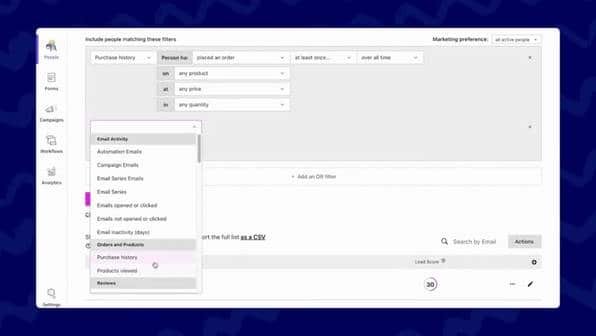
- Advanced segmentation that helps marketers target a particular audience group based on behavior and preferences. You can tailor your marketing strategies, especially for e-commerce customers, and elevate their shopping experience.
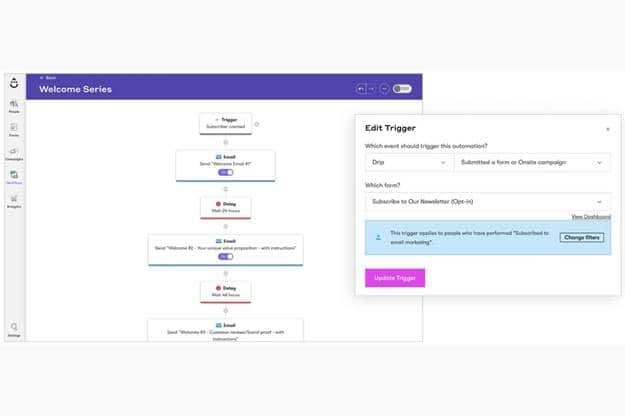
- Pre-built automation guidebooks- customized workflows that automate mundane, repetitive tasks. This helps in focusing on what truly matters- reaching the right audience at the right time.
- Comprehensive and in-depth analytics on campaign performance. Your team can now tweak campaigns in real-time to elevate targeting efficiency and engagement rates.
Pros
- One of the best email automation workflows out there. Automation builder that offers pre-built workflows, trigger points, and several customization options. This feature works as an automation playbook that aligns marketing processes across all email campaigns. You can also share your personal workflows with other team members.
- User-friendly interface that facilitates ease of use through intuitive dashboards.
- Allows teams to deliver unlimited emails to over 30k marketing contacts.
- Facilitates dynamic audience segmentation and list creation. If a subscriber fits into the ICP, the platform automatically adds them to the list.
Cons
- E-commerce workflows require more APIs and support. Thereʼs a severe lack of integration due to limited APIs and no FAQs to guide users.
- Limited customization features. This impacts the ability to personalize workflows and the email builder.
- Faulty saving settings and a lack of training resources often result in email management complexities.
- High subscription costs deter startups and small businesses from opting for Drip.
Pricing
Drip email marketing platformʼs price points only depend on the number of contacts-
- Thereʼs no free plan, but a 14-day trial period.
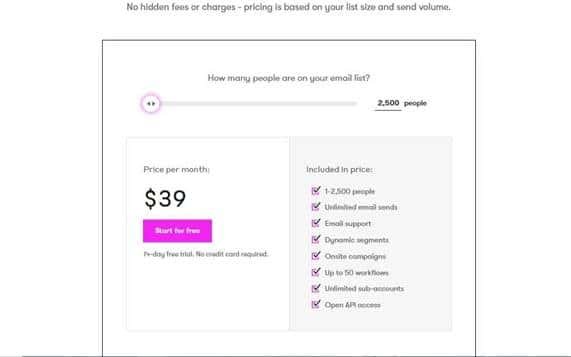
- The paid plan starts from $39 per month for 2500 contacts. And as the number of contacts increases, the price increases. Every other feature generally remains the same, with a few specific add-ons.
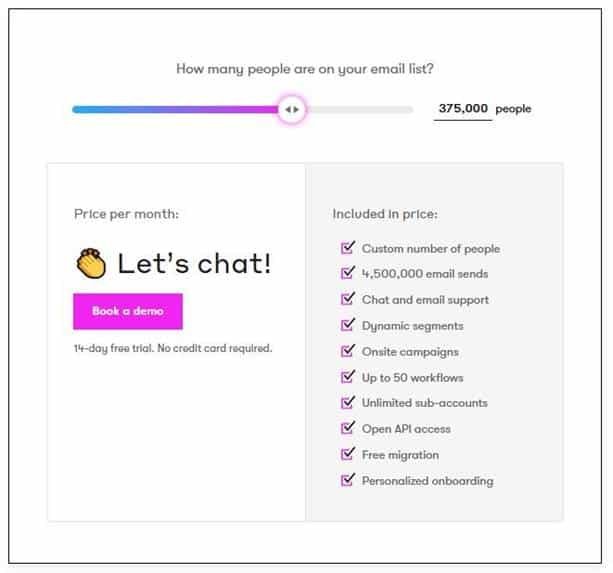
Hereʼs a little comparison for a plan for 2500 contacts and another one for 375k contacts:
6. Zoho Campaigns
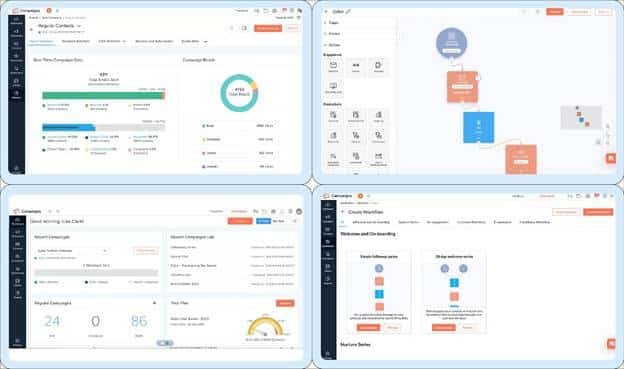
Zoho Campaigns features a drag-and-drop email editor with automation tools and CRM integration. It’s a free version that can accommodate up to 2,000 contacts and charges its customers reasonably for the paid plans.
Some marketers might feel that the interface looks less advanced in comparison to some of the competitors. And to answer your question about whether Zoho Campaigns is worth it?
Gartner gave it a 4.4 (out of 5). Thatʼs your answer.
Significant Features that Stand Out
- Zoho campaigns donʼt necessarily have any unique features over its competitors. However, it stands out in its competency, especially in the following areas of email marketing:
- Creation of automated workflows that trigger through specific customer behavior, especially ones that illustrate high intent. Or none at all, such as prolonged inactivity.Audience segmentation and grouping based on granular data, from demographic and purchase behavior to engagement levels. Helps abolish the one-size-fits-all approach. You can run seasonal promotions and tailor messages for each account.
- Data-powered A/B and split testing. Zoho Campaigns determines the winner- more open rates, more clicks, and more conversions.
- 360-degree analytics and reporting to measure campaign performance at every necessary step. And grasp whatʼs working and what requires improving.
- Data-driven personalization at scale. Tokens that help customize email content for each account, automated follow-ups powered by behavioral triggers, and dynamic content blocks tailored to different segments.
Pros
- Ease of use that further elevates the overall customer comms and campaign management.
- Mass emailing facets are perfect for businesses that deliver company memos, promotions, and newsletters in bulk.
- Autoresponders that help elevate engagement steadily and move prospects gradually down the funnel.
Cons
- A clunky user interface that impacts campaign management negatively.
- A complex learning curve that ends up delaying the initial setup.
- Template building and report generation require a revamp. Some designs are outdated.
- It could prove to be expensive for some SMBs.
Pricing
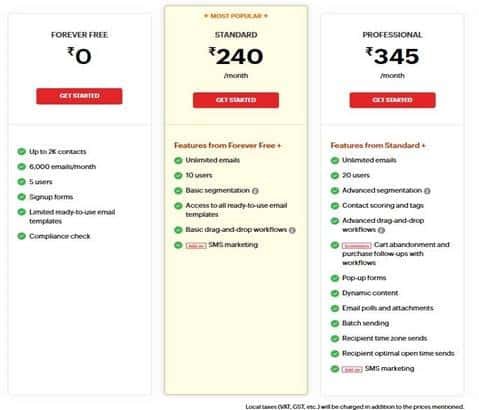
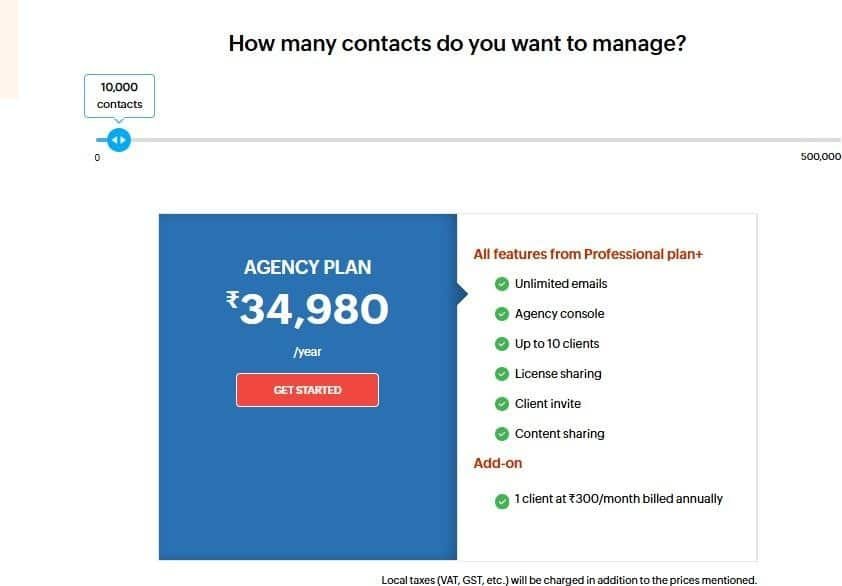
There are 3 plans to leverage Zoho Campaigns for businesses. And just 1 plan for agencies thatʼs billed annually. The price points for all the plans fluctuate with the number of contacts.
All of them come with a 14-day trial period.
- Businesses- the starting point is 500 contacts, and the max. is 500k contacts.
- Agencies- the starting point is 100k contacts, and the max. is 500k contact
Source: Zoho Campaigns
7. MailerLite
Source: MailerLite
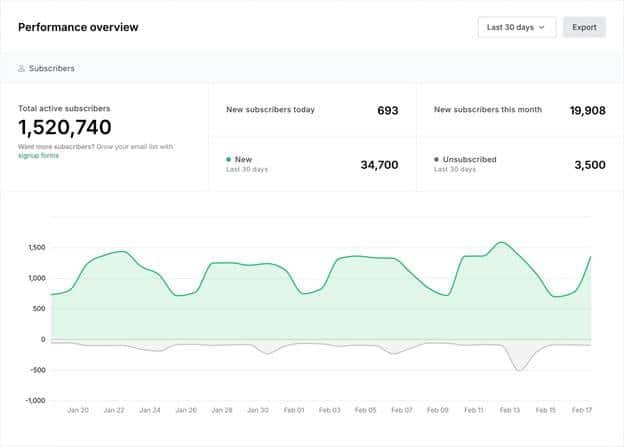
MailerLite is an email marketing platform for different businesses, like e-commerce stores and bloggers. And itʼs more of a lightweight alternative.
It has a free plan for up to 1,000 subscribers with unlimited emails and a drag-and-drop editor. But overall, itʼs cheap and offers value for money. And is mostly used to design campaigns, manage subscriber lists, and create automated workflows.
The only problem is that it does not include templates in the free version. MailerLite is a tool you can use with website and landing page builders.
Significant Features that Stand Out
- Curate email campaigns with existing templates and campaign builder tools in a few minutes. There are three different email editors- rich text editor, drag and drop, and customer HTML editor.
- You can use the AI writing feature to craft compelling headings and text. And also embed YouTube videos in your email content.
- The subscriber toolkit helps manage the mailing list after effective segmentation.Built-in image editor that lets your team resize, crop, and edit any image to fit the aesthetic and visual requirements of the email.
- Allows third-party app integration, such as Shopify, WordPress, Facebook, and WooCommerce.
Pros
- Affordable price points that are great for growing and small businesses.
- Entails a comprehensive set of features, from email campaign development and landing page builder to email automation- all in a single place.
- User-friendly and intuitive interface thatʼs great for beginners.
- High email deliverability rates.
Cons
- Lack of advanced e-commerce tools that limit access to online stores, especially ones that may need advanced features.
- Automation capabilities are quite basic for low-tier plans.
- Limited data, even for in-depth tracking and reporting.
- No email preview feature or built-in spam testing, which can impact final optimization.
- Strict account approval can end up delaying campaign set-up.
- Limited and no immediate customer support.
Pricing
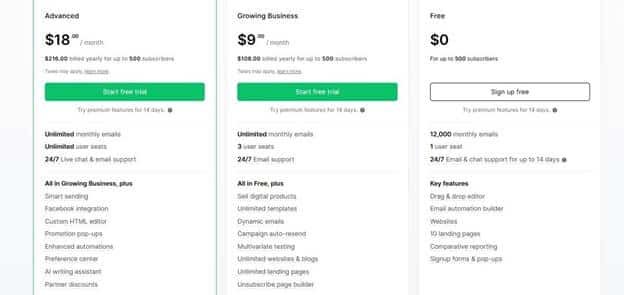
MailerLite offers pricing plans for two different categories- marketing and transactional emails.
For the marketing one, the min. contacts are 500 and the max. is 500k. These are the monthly plans:
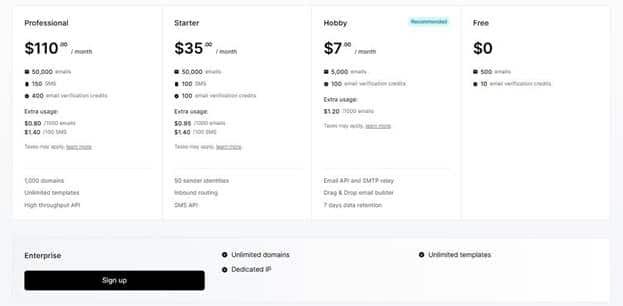
For transactional emails, min. contacts are 3k and the max. is 2M. These are what the monthly plans look like:
Source: MailerLite
Note: You can also save up to 20% by opting for the yearly plans.
8. Campaigner
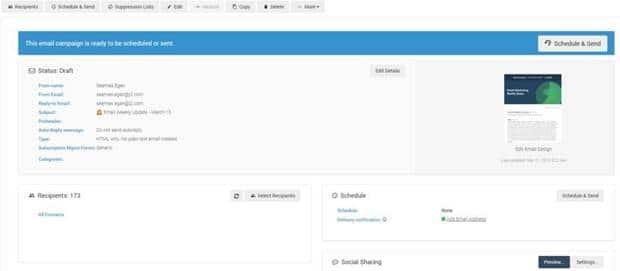
Campaigner is a marketing automation platform intended for teams with a high level of marketing experience. It has the latest and most useful functions like segmentation, automation, reporting, and landing page creation.
The Campaigner plan is not free and can be expensive, but a 30-day free trial is a good option for businesses to gauge whether or not the tool is suitable for them.
Significant Features that Stand Out
- Advanced automation and segmentation features to seamlessly build hyper-targeted campaigns.
- Dynamic content customization that allows personalization for recipients based on data and behavior.
- Comprehensive data analytics and reporting tools.
- Effectively bridges all the major email marketing pain points, such as subscriber management, tracking campaign performance, and conversion optimization.
Pros
- Advanced segmentation for hyper-precise targeting.
- A/B testing and additional data-backed decision-making.
- Flexible integration range.
Cons
- Has a complex learning curve that may slow down initial campaign set-up.
- Customer support doesn’t entail immediacy during critical times.
- Template design options are limited, which could impact the visual appeal of all campaigns.
Pricing
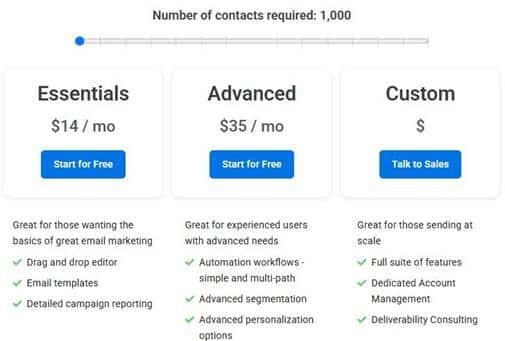
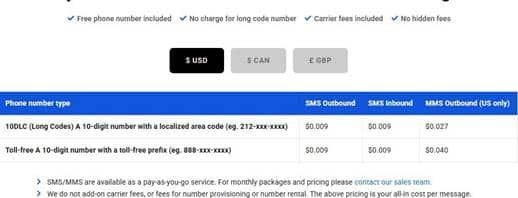
Campaigner lies in the mid-range market as compared to its competitors. Thereʼre additional costs involved for higher tiers and premium feature add-ons.
The brand offers three different plans:
- Starter: Begins at $59 per user/month with a minimum of 5 seats, especially for small businesses.
- Essential: Begins at $179 per user/month with a minimum of 10 seats, and comprises advanced automation features.
- Advanced: Begins at $649 per user/month with a minimum of 25 seats, perfect for large-scale campaigns. And is billed yearly.
For marketing:
For transactional:
Source: Campaigner
9. GetResponse
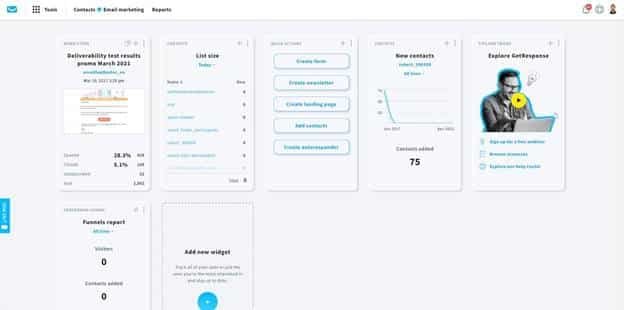
GetResponse is another solid option for beginners. They offer a wide range of essential features, from email marketing and basic automation tools to landing pages and list management.
The nice thing about GetResponse is that you can easily add more features as your business grows and your marketing needs change.
Significant Features that Stand Out
- A solid email marketing automation set up: Autoresponders are available even on low-tier plans and can effectively help trigger time-based emails. And stack up emails in drip sequences.
- Segmentation builder: Uses a bunch of comprehensive triggers, especially made for e-commerce users: lead scores, tags, geolocation, sign-up source, etc. Your behavioral targeting strategy can also be tied to funnel actions and page visits.
- Dynamic email content: Personalize product blocks and offers depending on the account. This is quite useful for cross-selling and promos.
- Beyond forms: GetResponse offers you landing pages, and not just forms. You can choose any of the pre-built funnels and even thank you pages. And then also drag and drop sign-up forms, promo codes, and existing lead magnets. You can plug in your own tools to build a page that fits your requirements.
- A dedicated e-commerce dashboard that allows integration with e-commerce platforms such as Shopify, Magento, and PrestaShop.
Pros
- Automation builder with list triggers- visually easy to navigate and use.
- Built-in live chat widget as well as a mobile app for successful lead capture.
- Conversion-funnel developer that amalgamates forms, emails, and landing pages.
- Ability to run ads on Google, Facebook, and Instagram from the GetResponse account.
- Free access to image builder, pop-ups, and image library.
Cons
- No automation is available in the free or the Starter plan.
- All-in-one design adds clutter for those only hoping to leverage email.
- Support is quite inconsistent.
- Segmentation is not available based on events.
Pricing
- Starter: $19 per month. Offers unlimited emails, landing page templates, autoresponders, low-tier automation, and chat support.
- Marketer: $59 per month. Every feature available in Starter plus sales funnels, full automation, abandoned cart, and subscriber segmentation.
- Creator: $69 per month. Every feature available in the Marketer plus course builder, with up to 500 students, access to webinars, and no transaction fees.
- Enterprise: Customer pricing. Every feature available in Creator plus transactional emails, priority support, unlimited users, dedicated IP, and SSO.
10. AWeber
Source: AWeber
AWeber is another excellent first step for businesses facing a financial crunch.
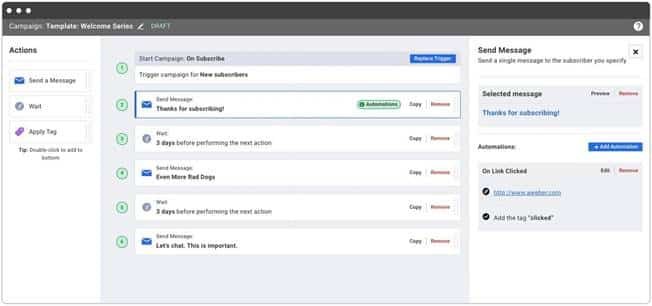
They possess numerous features to simplify things – for instance, pre-designed templates, an AI design assistant, and a drag-and-drop builder for emails and landing pages. And even a marketplace where you can find pre-built campaigns.
They also have some automation features to assist you in the smooth transition to the automatic mode.
Significant Features that Stand Out
- Drag and drop email builder: Hosts an extensive set of over 700 customizable HTML email templates. And the fascinating part is that all of them are dynamic, responsive, and auto-size depending on the device you use.
- Smart designer email builder: You can customize your email depending on your website. The logo, branding, color palette, and most crucially, your business goal are taken into consideration. And then the builder presents seven templates that align with your brand relevance.
- Landing page builder: Aweberʼs landing page builder offers you a crucial starting point. It hosts over 160 templates that cater to different industries and are highly customizable. From forms to multimedia, you can tweak and spruce up content as you want.
- Smart content feature: You can pull in content from other platforms, such as Facebook, Google Maps, and Shopify, by extracting content from URLs. And you can directly tag subscribers from completed forms to set up automated campaigns.
Pros
- Automated rules to manage and organize subscriber lists.
- PayPal integration facilitates a look into the sales in your AWeber account, and allows you to take marketing actions on them.
- Robust, quick, and friendly support for first-time users, and even educational tools.
- Tons of different landing page templates that span a plethora of categories and industries.
Cons
- You wonʼt receive the expected bang out of your buck. The pricing is way too high for a platform that doesnʼt entail several of the pro features as its competitors.
- The deliverability rates are below average.
- Lacks a lot of advanced features, such as design testing and built-in marketing automation.
Pricing
- $0: 500 subscribers and 3000 email sends. The unlimited email sends feature and annual discounts begin with the paid plans. And the price points vary according to the number of subscribers.
- $15: 500 subscribers and unlimited email sends. Annual discounts are available.
- $35: 2,500 subscribers.
- $60: 5k subscribers.
- $100: 10k subscribers
Why is Choosing the Right Email Marketing Platform So Vital?
Email marketing is proportional to hitting the bullʼs eye with your marketing comms. Itʼs surgically precise and extremely targeted. And thereʼs unremarkable accuracy.
And honestly, whether you use this channel as the primary marketing channel or as a supplement, it doesnʼt change the benefits it can afford to drive sales for your business. Itʼs one of the most efficient channels to keep in pace with socials, and a trusted bridge between your brand and its audience.
So, whoever said that email marketing is dead isnʼt aware of the latest stats. And open rates are just the beginning.
Go beyond perceiving them as percentages, but as signals- not just who is engaging with your email content, but why they are doing it.
- DemandSage: Email marketing campaigns have a 3600% ROI.
- HubSpot: 1 out of every 3 marketers uses email marketing in their marketing frameworks.
- Litmus: 44% of marketing professionals state that email is the most effective channel for their marketing efforts.
- HubSpot: Teams earn $36 for every dollar spent on their email marketing campaigns, i.e., it offers 36 times the investment made.
- Statista: Emails are 40 times more efficient for customer acquisition than social media.
- Twilio: Over 79% of consumers globally prefer email for communications.
These statistics are proof that there are great returns from strategic email marketing endeavors. But sowing better seeds can reap better results.
This means choosing the right email marketing platform.
There are hundreds of options in the market as of this moment. And nitpicking one can be quite scary. The market is aware that the term “freeˮ attracts every marketer looking to cut down their already-shrinking budgets.
However, a fruitful email marketing campaign demands looking beyond pricing points.
Honestly, several free tools can solve your marketing problems. But do they offer you the same value? This is the actual question.
What if a one-time investment can turn into an opportunity of a lifetime? One that delivers returns consistently.
Itʼs something to wonder about.
Choosing the best email marketing platform results from an in-depth analysis of your needs and budget.
If you want to interact and communicate with your audience through email, consider using one of these email service providers.
All these providers are the best and will help you to do the work proficiently. You can send email newsletters, offers, updates, and so on to your email clients and people globally through a single platform.
Using the free trials will let you know if it will be perfect for your current marketing workflow. Take it slow, test these platforms out, and conduct functional comparisons. Do they even align with what youʼre attempting to build?
Alignment is imperative. If the email marketing platform doesnʼt align with your needs and goals, theyʼre simply not worth it. But the right one? Itʼll serve as the medium to accelerate your success and revamp your business communications.
The answer is straightforward.